<5-2>功能-线Line
# <5-2>功能接口(线Line):
### ==5-2-Line-1-1==: 添加 路径轨迹
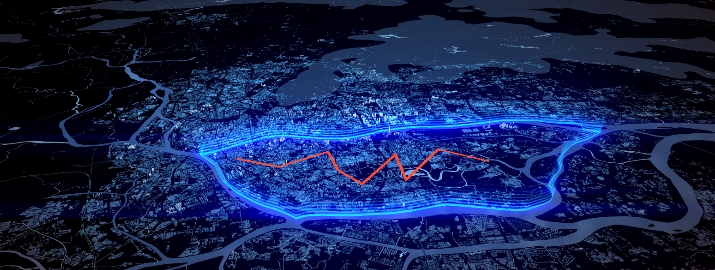
- **接口方法名**:==STU_AddLinePath==
**参数说明:**
>i< id > 轨迹线唯一id;
< width > 轨迹线宽度;
< r > 颜色值R,建议取值范围 0 - 1之间;
< g > 颜色值G,建议取值范围 0 - 1之间;
< b > 颜色值B,建议取值范围 0 - 1之间;
< line > 轨迹点数据,起始经纬度点到尾点,至少2个点;
< longitude > 经度;
< latitude > 纬度;
< height > 点高度;
**参数示例:**
```
{
"id": "test1",
"width": 1.1,
"r": 0.93,
"g": 0.09,
"b": 0,
"line": [
{
"longitude": "113.25163907",
"latitude": "23.10045305",
"height": "0.2"
},
{
"longitude": "113.26795882",
"latitude": "23.09083306",
"height": "0.2"
},
{
"longitude": "113.28905848",
"latitude": "23.09863304",
"height": "0.2"
},
{
"longitude": "113.29045845",
"latitude": "23.08383306",
"height": "0.2"
},
{
"longitude": "113.29735835",
"latitude": "23.07263306",
"height": "0.2"
}
]
}
```
>i 返回参数:
{
"method": "STU_AddLinePath",
"exception": null,
"data": "success"
}
---
### ==5-2-Line-2-1==: 删除 路径轨迹(按Id删除)
- **接口方法名**:==STU_DeleteLinePathById==
>i< id > 按id参数删除路径轨迹
**参数示例:**
```
{
"id": [
"id_0",
"id_1",
"id_2",
"id_3",
"id_4",
"id_5"
]
}
```
>i 返回参数:
{
"method": "STU_DeleteLinePathById",
"exception": null,
"data": "success"
}
---
### ==5-2-Line-2-2==: 删除 所有 路径轨迹
- **接口方法名**:==STU_DeleteAllLinePath==
>i无参数 删除所有添加的轨迹线
>i 返回参数:
{
"method": "STU_DeleteAllLinePath",
"exception": null,
"data": "success"
}
---