中间键配置方法
# 基本路径
https://sim.ecsiot.com/api/
# 列表
## 使用场景
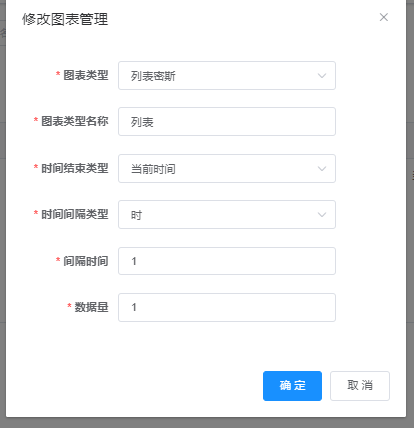
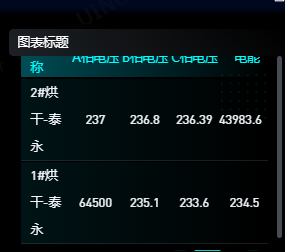
以列表形式展示出各设备的各变量实时值
注意:在中间平台选择的聚合方式的时候选择实时值,不要选择其他。
## 优锘
### 路径
/mn/mnChartInfo/lieBiaoMiSi
例子:
### 接口参数
id来源于中间平台的各图表中的id
{
"id": "127"
}
### 属性
#### 自定义配置项
自定义配置项中配置表头名称
注意:默认的第一个表头填写设备名称
[
"设备名称",
"A相电压",
"B相电压",
"C相电压",
"电能"
]
## 中间平台

## 效果图
###
# 横向柱状图
## 优锘
### 路径
/mn/mnChartInfo/hengXiangZhuZhuangTu
完整路径例子:
https://sim.ecsiot.com/api/mn/mnChartInfo/hengXiangZhuZhuangTu
### 接口参数
id来源于中间平台的各图表中的id
{
"id": "127"
}
# 纵向柱状图
## 优锘
### 路径
/mn/mnChartInfo/zongXiangZhuZhuangTu
完整路径例子:
https://sim.ecsiot.com/api/mn/mnChartInfo/zongXiangZhuZhuangTu
### 接口参数
id来源于中间平台的各图表中的id
{
"id": "127"
}
# 折线图
## 优锘
### 路径
/mn/mnChartInfo/zheXianTu
完整路径例子:
https://sim.ecsiot.com/api/mn/mnChartInfo/zheXianTu
### 接口参数
id来源于中间平台的各图表中的id
{
"id": "127"
}
# 双向柱状图
## 优锘
### 路径
/mn/mnChartInfo/shuangXiangZhuZhuangTu
完整路径例子:
https://sim.ecsiot.com/api/mn/mnChartInfo/shuangXiangZhuZhuangTu
### 接口参数
id来源于中间平台的各图表中的id
{
"id": "127"
}
# 横向多项柱状图
## 优锘
### 路径
/mn/mnChartInfo/hengXiangDuoXiangZhuZhuangTu
完整路径例子:
https://sim.ecsiot.com/api/mn/mnChartInfo/hengXiangDuoXiangZhuZhuangTu
### 接口参数
id来源于中间平台的各图表中的id
{
"id": "127"
}