干货:离线部署Docker的脚本制作与使用
# Linux 离线安装docker的过程
**前言**
有时候会遇到服务器不能联网的情况,这样就没法用yum安装软件,docker也是如此,针对这种情况,总结了一下离线安装docker的步骤,分享给大家
**1. 准备docker离线包**
[docker官方离线包下载地址](https://download.docker.com/linux/static/stable/x86_64/)
下载需要安装的docker版本,我此次下载的是
```
docker-17.03.2-ce.tgz版本
```
**2. 准备docker.service 系统配置文件**
```
[Unit]
Description=Docker Application Container Engine
Documentation=https://docs.docker.com
After=network-online.target firewalld.service
Wants=network-online.target
[Service]
Type=notify
# the default is not to use systemd for cgroups because the delegate issues still
# exists and systemd currently does not support the cgroup feature set required
# for containers run by docker
ExecStart=/usr/bin/dockerd
ExecReload=/bin/kill -s HUP $MAINPID
# Having non-zero Limit*s causes performance problems due to accounting overhead
# in the kernel. We recommend using cgroups to do container-local accounting.
LimitNOFILE=infinity
LimitNPROC=infinity
LimitCORE=infinity
# Uncomment TasksMax if your systemd version supports it.
# Only systemd 226 and above support this version.
#TasksMax=infinity
TimeoutStartSec=0
# set delegate yes so that systemd does not reset the cgroups of docker containers
Delegate=yes
# kill only the docker process, not all processes in the cgroup
KillMode=process
# restart the docker process if it exits prematurely
Restart=on-failure
StartLimitBurst=3
StartLimitInterval=60s
[Install]
WantedBy=multi-user.target
```
**3. 准备安装脚本和卸载脚本**
安装脚本 `install.sh`
```
#!/bin/sh
echo '解压tar包...'
tar -xvf $1
echo '将docker目录移到/usr/bin目录下...'
cp docker/* /usr/bin/
echo '将docker.service 移到/etc/systemd/system/ 目录...'
cp docker.service /etc/systemd/system/
echo '添加文件权限...'
chmod +x /etc/systemd/system/docker.service
echo '重新加载配置文件...'
systemctl daemon-reload
echo '启动docker...'
systemctl start docker
echo '设置开机自启...'
systemctl enable docker.service
echo 'docker安装成功...'
docker -v
```
**卸载脚本 uninstall.sh**
```
#!/bin/sh
echo '删除docker.service...'
rm -f /etc/systemd/system/docker.service
echo '删除docker文件...'
rm -rf /usr/bin/docker*
echo '重新加载配置文件'
systemctl daemon-reload
echo '卸载成功...'
```
**4. 安装**
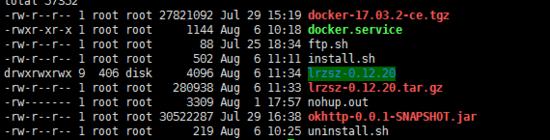
4.1 此时目录为:(只需要关注docker-17.03.2-ce.tgz、docker.service、install.sh、uninstall.sh即可)
4.2 执行脚本 `sh install.sh docker-17.03.2-ce.tgz`
执行过程如下:
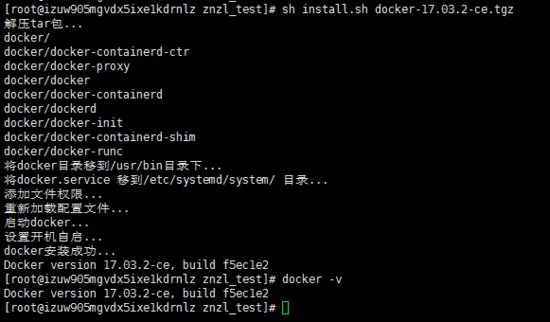
待脚本执行完毕后,执行 `docker -v`
发现此时docker已安装成功,可以用` docker --help `查看docker命令,从现在开始你就可以自己安装image和container了
```
sh uninstall.sh
```
4.3 如果你想卸载docker,此时执行脚本` sh uninstall.sh `即可,执行过程如下:
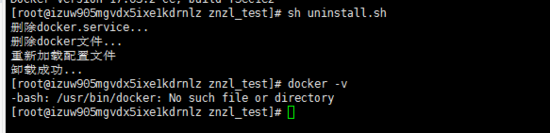
此时输入 `docker -v` ,发现docker已经卸载
**总结**
以上所述是小编给大家介绍的Linux 离线安装docker的过程(一键式安装),希望对大家有所帮助,如果大家有任何疑问请给我留言,小编会及时回复大家的。在此也非常感谢大家对脚本之家网站的支持!
如果你觉得本文对你有帮助,欢迎转载,烦请注明出处,谢谢!